
You Set it Up, Your Guests Run the Event
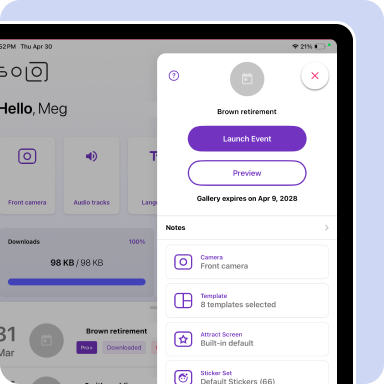
Most photo booth software assumes someone's standing next to the iPad all night. This one doesn't. Build the event, lock in your settings, and ship the unit out. Your client and their guests take it from there. If something needs to change once it's in their hands, simply remote-in and adjust it from wherever you are. It's built to run without you, and built to grow with you.
One Dashboard, Any Fleet Size
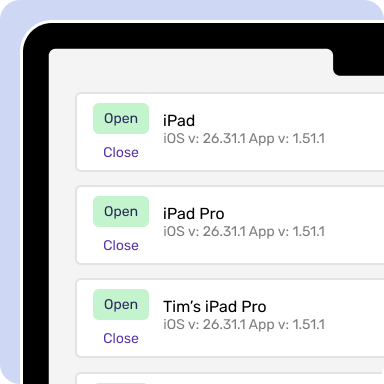
Booth.Events works for one operator running one booth, and it works just as well at ten booths or ten thousand. Run your whole fleet from a single browser, and schedule events to launch automatically on each iPad. If changes need to be made mid-event, Live Sync pushes them to every device instantly, no matter where they are.
Pricing Built to Scale With You
Scaling doesn't have to cost more. Once you cross 20 iPads, pricing works differently. The more you run, the wider your margins get. Reach out and we'll build a plan around how you actually operate.
How do I ensure clients can actually set up and operate the booth without me there?
Three keys make this work: crystal-clear instructions, pre-configured equipment, and remote support. Include visual step-by-step setup guides (photos/videos showing exactly what plugs in where), ship everything pre-tested and ready to go (clients just need to unpack, connect, and power on), and use software like Booth.Events with intuitive guest interfaces that require zero technical knowledge. Many flat packers also include a laminated quick-start card, QR codes linking to setup videos, and their phone number for real-time support. With Live-Sync, you can even monitor the booth remotely and troubleshoot issues without being on-site. When you remove complexity and provide excellent support, client success rates are extremely high.
What happens if equipment gets damaged or doesn't work during an event?
Protect yourself with solid rental agreements that include damage deposits, liability waivers, and clear terms about equipment responsibility. Require refundable security deposits ($200-$500) that cover minor damage or missing items. Insurance is essential—both for your equipment and liability coverage. Ship backup supplies when possible (extra printer ribbon, backup cables). With remote monitoring, you can often diagnose and fix software issues in real-time. For hardware failures, many flat packers offer partial refunds or credits rather than emergency replacements. Yes, incidents happen occasionally, but good contracts, insurance, and client screening (require payment upfront, avoid red-flag bookings) minimize risks significantly.
How do I handle software licensing and updates for multiple booths in the field?
This is where the right software makes all the difference. Booth.Events lets you manage licenses remotely. You can activate them for specific dates, push updates over the internet, and monitor usage in real-time. Before shipping, you assign a license to that kit for the rental period. After the event, you can deactivate and reassign it to another kit. With Live-Sync, you can even push last-minute template changes or fix settings remotely if clients request adjustments. Cloud-based licensing means you're never locked to specific hardware. If a tablet breaks, you grab another one, activate the license, and ship it out. Flexible, scalable, and manageable even with dozens of kits circulating simultaneously.
What types of clients are best suited for flat pack rentals versus full-service?
Ideal flat pack clients: budget-conscious events (backyard parties, small gatherings, DIY weddings), clients with hands-on personalities who enjoy running things themselves, corporate events with tech-savvy staff, repeat customers who've used booths before, and events outside your service area where travel isn't feasible. Less ideal: high-end weddings expecting white-glove service, clients who seem technically anxious or overwhelmed, events where your brand presence matters, or situations where something going wrong would be catastrophic (you have no on-site control). Many operators run hybrid businesses where they offer full-service premium packages for high-end events and flat pack rentals for volume/budget market. Screen clients carefully during booking: ask about their comfort level with technology, explain the DIY nature clearly, and set appropriate expectations upfront.
Booth.Events is perfect for:
AI Portraits
Easily transform your guests with amazing results.
Custom AI Prompts
Your vision. Your prompts. Their wow moment.
Glam Filter
Strike the perfect balance: enhancing without losing personality.
Colour Filters
Create a cohesive look across every capture with no manual editing.
Background Removal
Swap in custom backgrounds and creative scenes as easily as flicking a switch.
Photographs
Classic for a reason. Some things never go out of style.
Slow-Mo
Turn up the energy. Slow down the magic.
Boomerang
What goes around, goes viral.
Animated GIFs
The photo that can't sit still.
360 Spinner
Spin it. Share it. Steal the show.
Video Testimonials
The moments to save - all in their own words.
Custom Gallery
The experience doesn't end at the booth.
Printing
Digital is great. Print is forever.
Capture / Share Station
More guests. Less wait. Zero bottlenecks.
White-labelling
The booths that build reputation.
Live Sync
Access your booth from anywhere.
Custom Templates
Templates tailored to every occasion.
Support
Professional operators deserve the best.
Data Collection
The booth that pays beyond the event.
Our first event was great!
I am so happy with your app! Our customers said it was easy to use, smooth, and the customization options were great. Ease of use was very important because everyone was having a VERY good time by the end of the night.
Cindy Sanders
Join Our Facebook Group
Join the thousands and stay up to date with the latest updates, tip & tricks from industry experts, and share your business.